
Working on Assignments
Assignments let you complete work for your teacher, from adding sources to writing papers. This guide explains how to find your assignments, understand requirements, and submit your work.
Finding Your Assignments
Click on the Assignments section in the left sidebar. You'll see three sections under Assignments:
Active - work you need to complete
Submitted - work you've turned in or is past the close date
Returned - work your teacher has reviewed and returned to you
Click an assignment from your Active section under Assignments to open it.
Understanding Assignment Stages
Assignments move through different stages as you work on them. Each stage represents where your assignment is in the process, from when it's first created to when it's graded. Learn more about assignment stages in Understanding Assignment Stages in Scrible.
Understanding Assignment Requirements
Teachers can set different requirements depending on the assignment. Requirements are optional and vary by assignment - not all assignments will have all of these requirements.
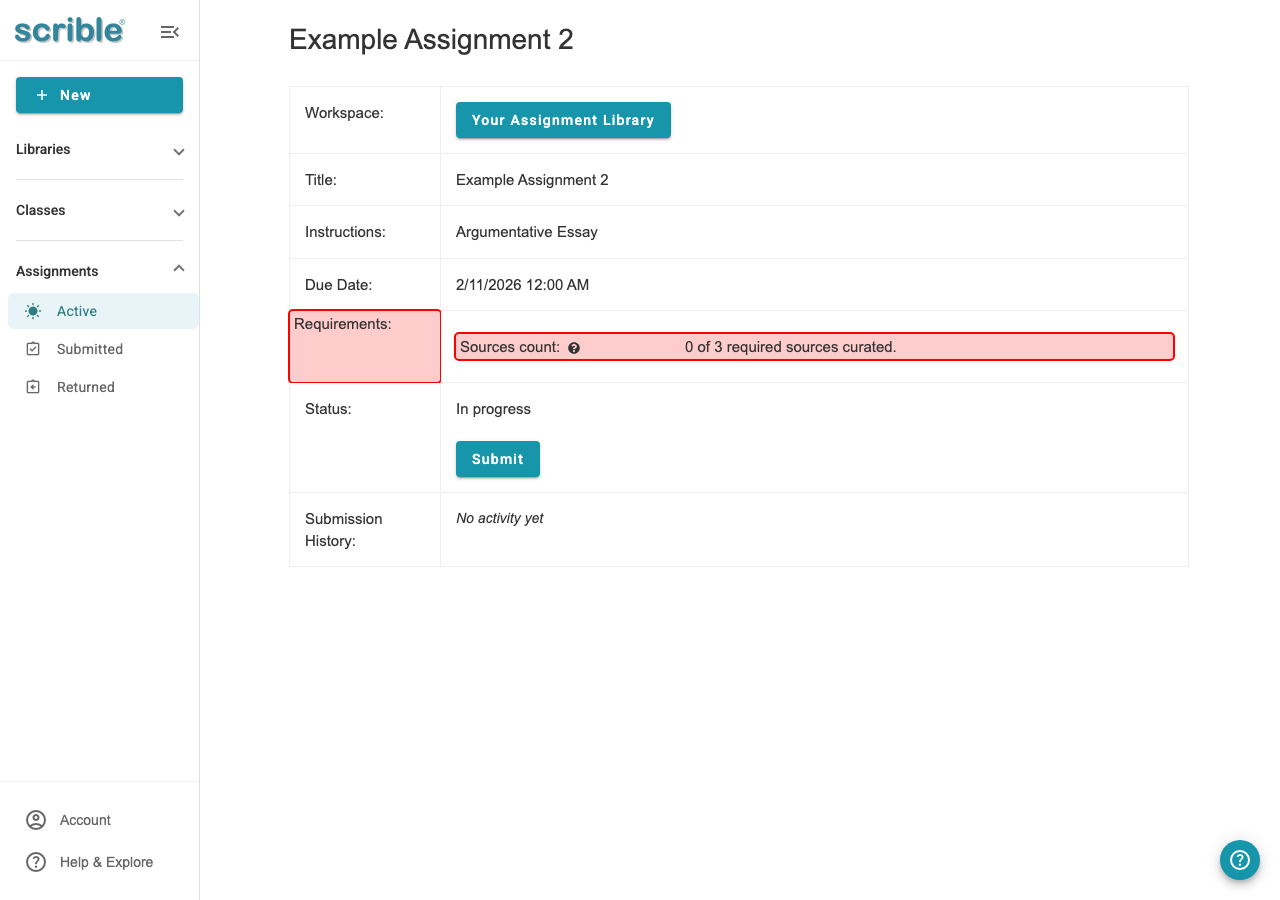
Types of Requirements
Sources Requirements
Your teacher can require a minimum number of sources for an assignment. For example, you might need to add at least 5 sources to your assignment library. You complete this requirement by working in the Sources tab.
Bibliography Requirements
Your teacher can require an annotated bibliography. If an annotated bibliography is required, the teacher can also set a minimum number of words for each citation annotation. For example, each annotation might need to be at least 10 words. Teachers can also require a minimum number of sources in your bibliography, such as including at least 3 sources. You complete these requirements by working in the Bibliography tab.
Document Requirements
Your teacher can require a minimum word count in your document. This requirement applies only to word processor documents like Google Docs or Microsoft Word. It does not apply to Google Slides or Google Sheets. For example, your document might need to have at least 500 words. You complete this requirement by working in the Documents tab.
Completing Your Work
Start by reviewing the assignment instructions in the assignment overview. Then work in the relevant tabs based on your assignment's requirements (note that you may not have all tabs or requirements, what you see will depend on how your teacher has defined your assignment):
Sources tab - Add sources to your assignment library
Annotations tab - Access a list of your source annotations (highlights, comments, etc)
Outline tab - Create an outline for your document
Bibliography tab - Create citations and citation annotations
Documents tab - Access or create documents for writing
If your teacher provided resources (sources and annotations), they will appear in your assignment library.
To access your writing document, click on the Documents tab. If your teacher provided a starter document, click to open it. If not, click the New Document button to create your own document in Google Docs or Microsoft Word.
When you open a document for the first time, it may take a moment to load. Once loaded, your document will open in Google Docs or Microsoft Word where you can begin typing or editing. You can use the full-screen button if you want a distraction-free workspace.
Submitting Your Assignment
After completing your work, you can submit your assignment from the Submit button at the top of your assignment library, or else return to the assignment overview and click Submit to turn in your assignment. Learn more in Submitting and Unsubmitting Assignments. If you have unfulfilled requirements when you try to submit, you'll get a notification of what additional required work you have to do.